
Canceling Claude Pro isn’t always obvious—especially if you subscribed through different platforms. Here’s the exact method that works in every case.
⚡ Quick Answer (Featured Snippet)
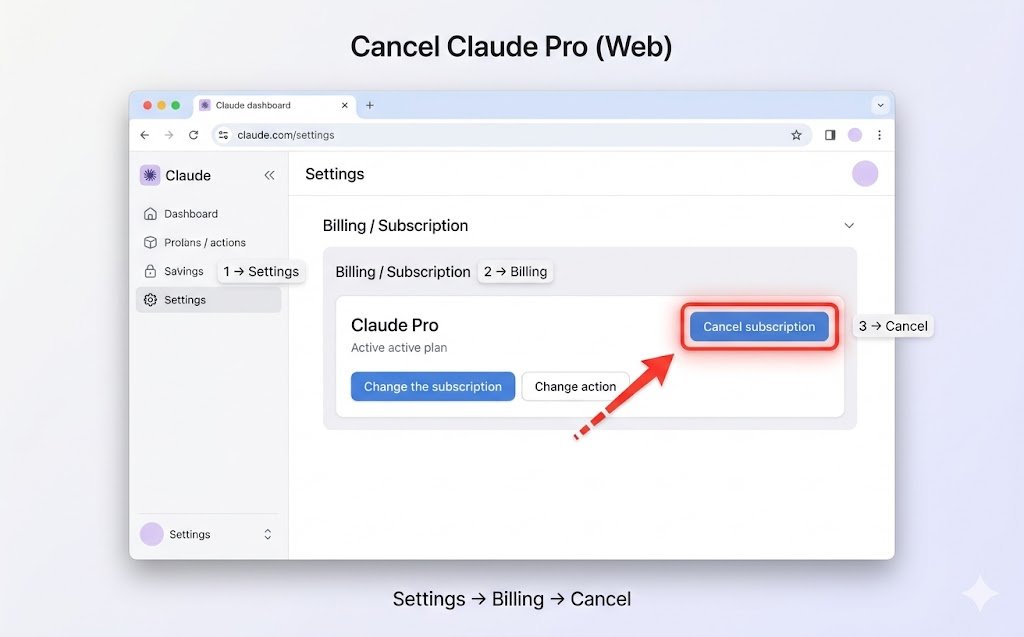
To cancel Claude Pro, log into your account, go to Settings → Billing, and click Cancel subscription. If you subscribed via Apple or Google Play, cancel through their subscription settings instead. After canceling, you’ll keep access until the billing cycle ends, and no further charges will apply.
🧭 How to Cancel Claude Pro (Direct Method)
If you subscribed directly through the web, this is the fastest way.
✅ Steps:
- Log into your Claude account
- Go to Settings
- Open Billing / Subscription
- Find your active plan
- Click Cancel subscription
- Confirm cancellation
Time: 1–2 minutes
Risk: None
👉 This is where most people get stuck:
They don’t see the cancel button—because they subscribed through another platform. Keep reading.
🔄 If You Subscribed via Different Platforms (Important)
This is the #1 confusion point, and most guides don’t explain it properly.
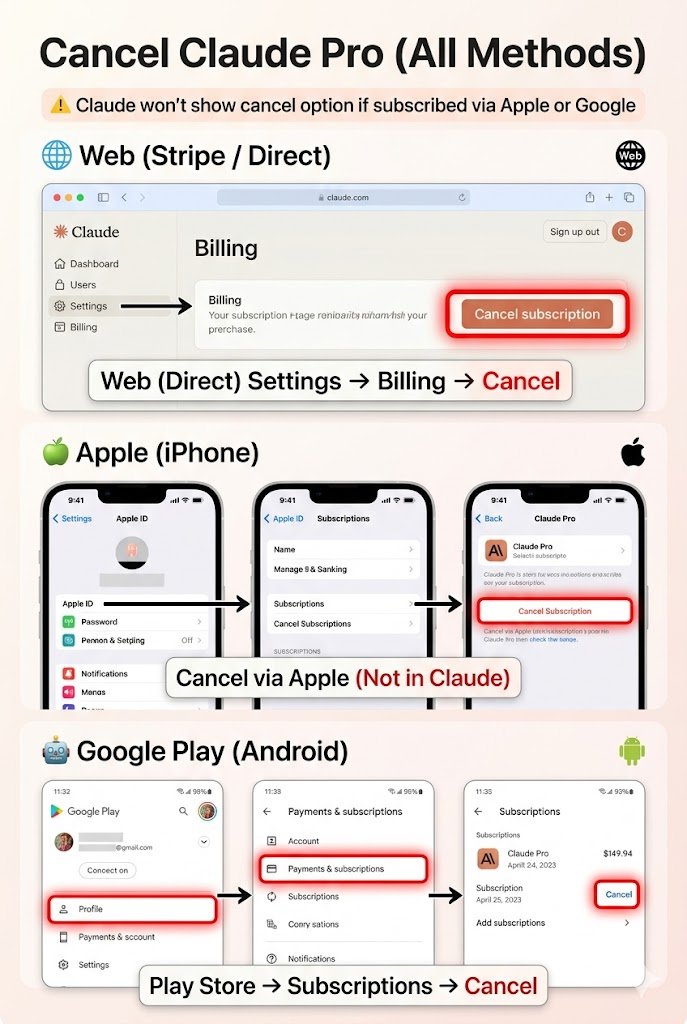
🔹 1. Subscribed via Web (Stripe / Direct Payment)
- Cancel inside your Claude account (steps above)
- You’ll see the billing section clearly
🔹 2. Subscribed via Apple (iPhone / iPad)
👉 Claude will NOT show a cancel option
You must cancel through Apple:
- Open Settings on iPhone
- Tap your Apple ID (top)
- Tap Subscriptions
- Select Claude Pro
- Tap Cancel Subscription
🔹 3. Subscribed via Google Play (Android)
- Open Google Play Store
- Tap Profile icon → Payments & subscriptions
- Tap Subscriptions
- Select Claude Pro
- Tap Cancel
⚠️ Important Warning:
“Claude won’t show the cancel option if you subscribed via Apple or Google.”
💸 Refund Process (High-Intent Section)
If you were recently charged, you might still be eligible for a refund.
✅ Steps:
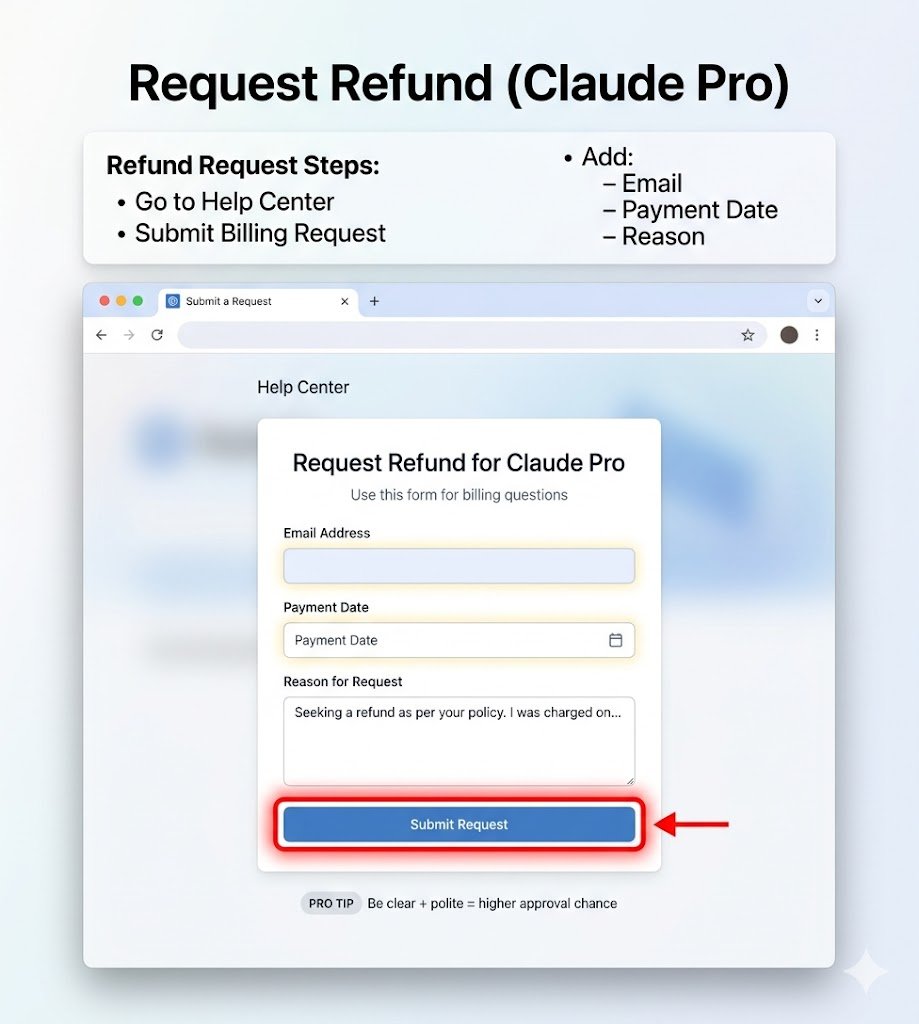
- Go to Claude’s support/help center
- Submit a billing request
- Include:
- Your account email
- Payment date
- Reason for refund
✍️ What to Write (Pro Template)
Hi, I was recently charged for Claude Pro and would like to request a refund. I canceled the subscription shortly after the billing date and did not intend to continue. I’d appreciate your help with this. Thank you.🎯 Best Strategy (Increases Approval Chances)
- Be polite
- Be specific about timing
- Request soon after charge
👉 Be polite + specific = higher refund chances
❌ Common Mistakes (Avoid These)
🔻 1. Looking in the Wrong Place
Trying to cancel in Claude when subscription is via Apple/Google.
🔻 2. Canceling After Billing Date
Canceling stops future charges—but doesn’t reverse current billing.
🔻 3. Thinking Uninstall = Cancel
Deleting the app does NOT cancel your subscription.
👉 This is the hidden part most users miss.
🔐 What Happens After Canceling
Once you cancel Claude Pro:
- ✔ You keep access until billing period ends
- ✔ No further charges
- ✔ Your chats and data remain safe
👉 You won’t lose anything immediately.
🛠️ Troubleshooting (Very Important)
❓ “I Don’t See Cancel Button”
👉 Check:
- Did you subscribe via Apple/Google?
- Are you logged into the correct account?
❓ “I’m Still Getting Charged”
👉 Possible reasons:
- You canceled after renewal
- You have multiple accounts
- Subscription still active on another platform
❓ “Wrong Account Logged In”
👉 Fix:
- Log out
- Log back in using correct email
⚡ Quick Summary (Fast Recap)
Web subscription → Cancel in Claude Settings
iPhone (Apple) → Cancel via Apple Subscriptions
Android (Google Play) → Cancel via Play Store
Refund → Contact support with polite request
❓ FAQ (SEO Boost Section)
🔹 Can I get a refund?
Yes, but not guaranteed. Request quickly after billing and be clear about your reason.
🔹 Will I lose my chats?
No. Your data stays محفوظ (safe). You just lose Pro features after billing ends.
🔹 Can I resubscribe later?
Yes. You can upgrade again anytime.
🔹 How to cancel Claude Pro on iPhone?
Go to Settings → Apple ID → Subscriptions → Claude → Cancel
🔹 How to cancel Claude subscription on Android?
Go to Play Store → Payments & subscriptions → Subscriptions → Cancel
🎯 Final Thoughts
Canceling Claude Pro is simple—once you know where to look.
Right platform = Right method = No confusion👉 Take action now:
- Check where you subscribed
- Follow the correct method
- Confirm cancellation
And if needed, submit a refund request immediately.