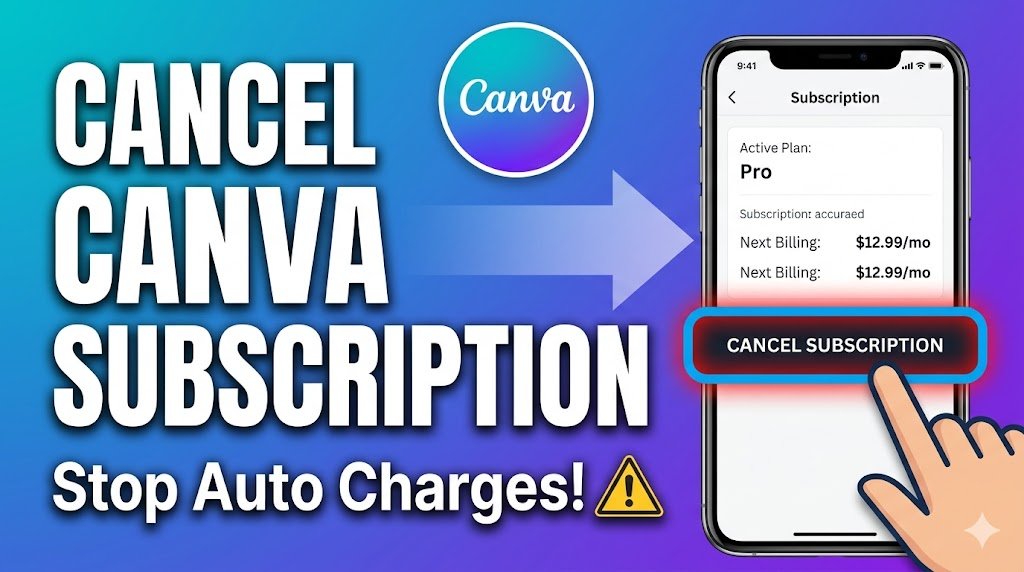

Getting charged for Canva even after you thought you canceled? Or struggling to even find the cancel button?
You’re not alone. Thousands of users face this exact issue every month—and most of the time, it’s because Canva hides the cancellation flow depending on how you signed up.
Let’s fix it properly, step-by-step.
Quick Answer (Featured Snippet)
To cancel your Canva subscription:
- Go to Account Settings
- Click Billing & Plans
- Select your active plan
- Click Cancel Subscription
- Confirm cancellation
Important: If you subscribed via mobile (Google Play or App Store), you must cancel from there—not Canva.
Step-by-Step Guide
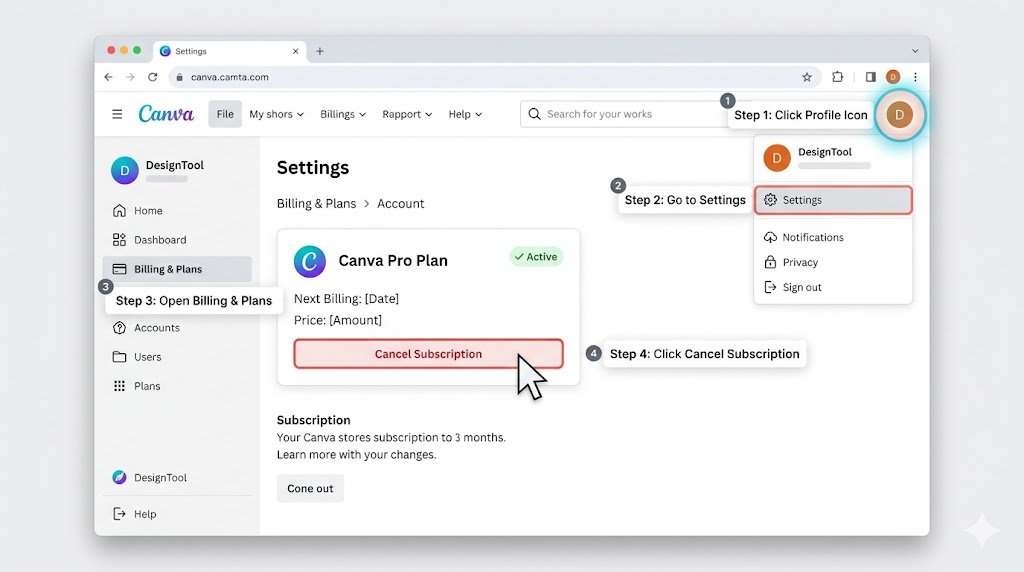
💻 Cancel Canva Subscription on Desktop
If you signed up via browser:
- Log in to your Canva account
- Click your profile icon (top right)
- Go to Settings → Billing & Plans
- Find your active Canva Pro plan
- Click “Cancel Subscription”
- Follow the prompts and confirm
👉 Pro tip: Take a screenshot of the confirmation page. It’s your proof.
📱 Cancel Canva Subscription on Mobile (Android)
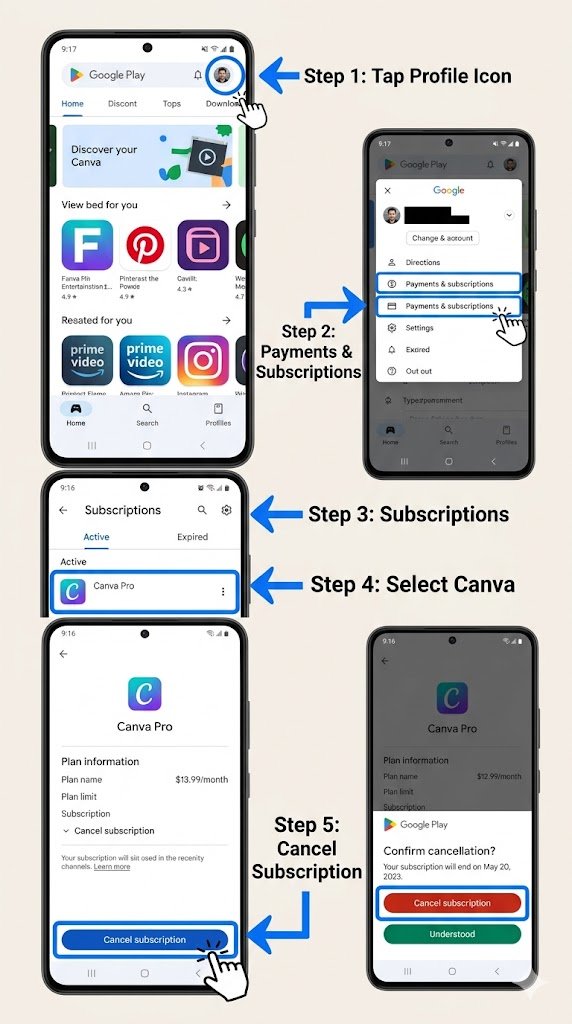
If you used Google Play:
- Open Google Play Store
- Tap your profile icon
- Go to Payments & Subscriptions
- Tap Subscriptions
- Select Canva
- Tap Cancel Subscription
🍏 Cancel Canva Subscription on iPhone (App Store)
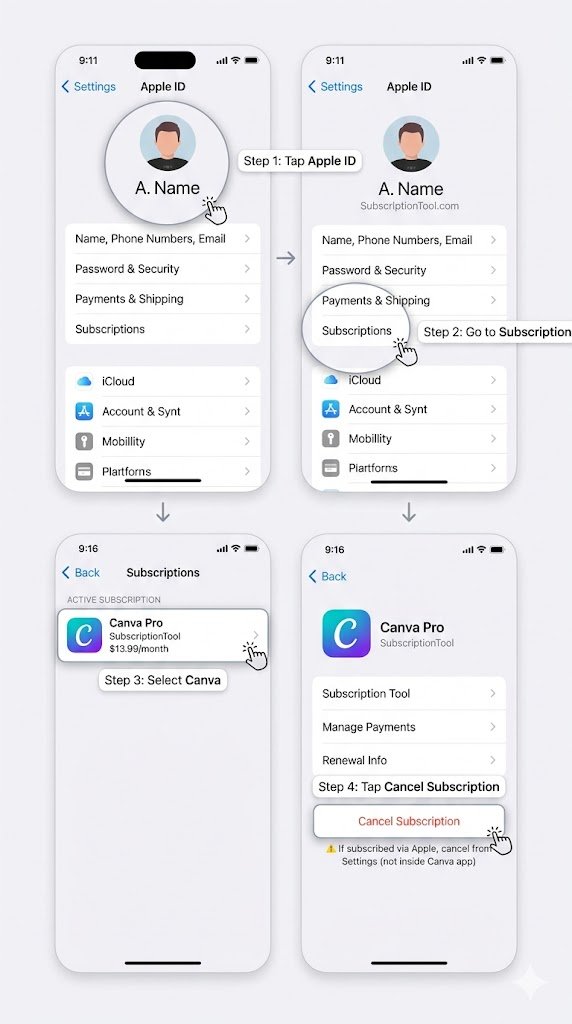
- Open Settings
- Tap your Apple ID (top)
- Go to Subscriptions
- Select Canva
- Tap Cancel Subscription
👉 This is where most people mess up. If you subscribed via Apple, Canva won’t show the cancel option.
What Happens After You Cancel Canva Subscription
Here’s what actually happens (no confusion):
- ✅ You keep access until your billing period ends
- ❌ No immediate refund (unless eligible)
- 🔒 Your account switches to free plan
- 🎨 Your designs remain saved
- ⚠️ Premium elements may become locked
Example:
If your billing date is the 25th and you cancel on the 10th, you can still use Pro features till the 25th.
Common Problems + Fixes
❌ “I don’t see the cancel option”
👉 Reason: You subscribed via mobile
✔ Fix: Cancel through Play Store or App Store
❌ “Still getting charged after canceling”
👉 Reason:
- Cancelled after billing date
- Multiple accounts
✔ Fix:
- Check email for correct account
- Verify cancellation confirmation
❌ “Can’t access billing settings”
👉 Reason: Logged into wrong account
✔ Fix: Try logging in via:
- Google login
- Email variations
Refund / Money Tips (VERY IMPORTANT)
Here’s what most blogs won’t tell you:
💸 Can you get a refund?
- Canva usually does NOT guarantee refunds
- But you can request one if:
- Charged accidentally
- Didn’t use the service
- Renewed unknowingly
📩 How to request a refund
- Go to Canva Help Center
- Submit a billing request
- Clearly explain:
- Date of charge
- Reason
- Account email
👉 Real tip:
Be polite + specific. Refund approval depends on how you present your case.
Pro Tips (Insider Insights)
🔥 1. Cancel BEFORE free trial ends
Set a reminder 1 day before trial expiry to avoid auto-charge.
🔥 2. Use “Downgrade” instead of cancel
Sometimes Canva offers discounts when you try to cancel.
🔥 3. Check team subscriptions
If you’re part of a Canva Team, billing may be handled by admin—not you.
🔥 4. Don’t delete account directly
Deleting your account does NOT always cancel billing.
🔥 5. Use a secondary email for trials
Helps avoid accidental renewals on your main account.
FAQs
1. Can I cancel Canva subscription anytime?
Yes. You can cancel anytime, but access continues until billing cycle ends.
2. Will I lose my designs after canceling Canva Pro?
No. Your designs stay safe, but premium elements may become locked.
3. Why can’t I cancel my Canva subscription?
Most likely you subscribed via mobile. Cancel from Play Store or App Store.
4. Does Canva auto-renew subscriptions?
Yes. Canva subscriptions renew automatically unless canceled.
5. How do I stop Canva billing immediately?
Cancel your plan before the next billing date. Immediate stop is not guaranteed.
6. Can I re-subscribe later?
Yes. You can upgrade back to Canva Pro anytime.
7. Is Canva free after canceling?
Yes, your account switches to Canva Free plan.
Final Thoughts (CTA)
Canceling Canva sounds simple—but one small mistake can keep you paying every month.
If you’re unsure, double-check where you subscribed from—that’s the key.